
Apply OpenSpy patches
This is the step that brings BF2142 back online. The OpenSpy patches point your game at a working login server, so you can create an account, see servers and join games.
What is OpenSpy, and why do I need it?
Online games like BF2142 rely on a master server: it handles your login and soldier data, lists the game servers in your browser, and records your progress. BF2142’s master server ran on GameSpy, and it went dark when GameSpy shut down in 2014.
OpenSpy is an open-source replacement for GameSpy. The OpenSpy patches redirect your game to it, so you can log in and play online again.
Who runs the servers?
Mostly Project Reclamation, a community effort that brought BF2142’s online features back using OpenSpy. The Reclamation team also makes BF2142 Hub.
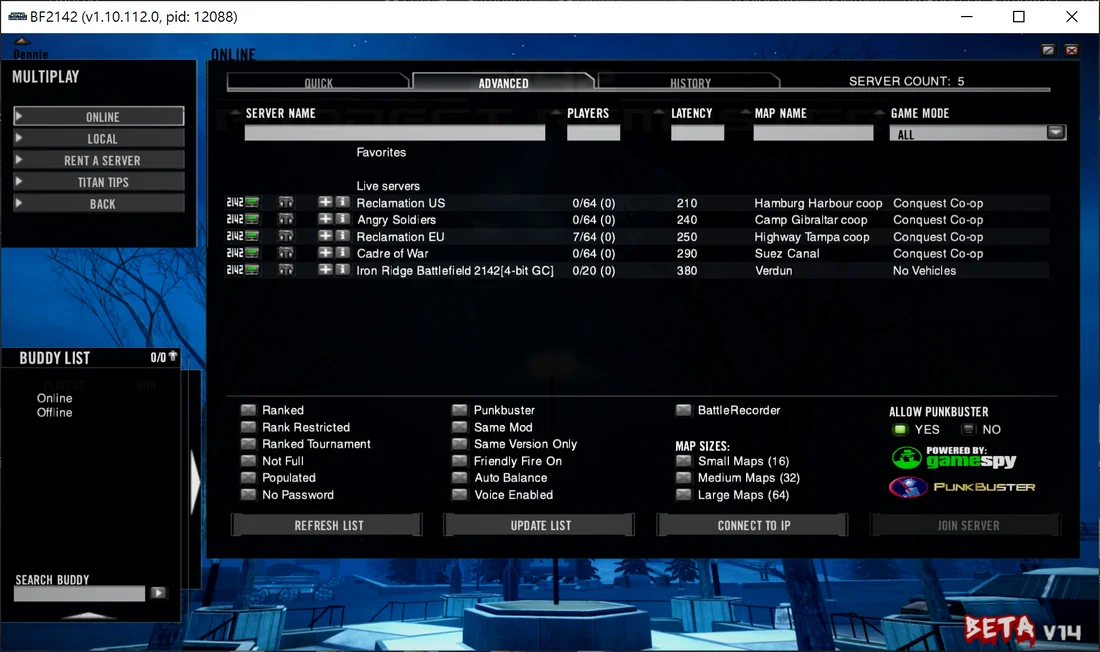
There are EU and US servers. EU usually gets busy from around 6 PM GMT, US from around midnight GMT, and weekends are busiest. You’ll find Conquest, Conquest Co-op and Titan1.
To join, you’ll need the OpenSpy patches (this guide) and the Reclamation map pack. The English-speaking community hangs out on their Discord.
Do I get all the unlocks?
Yes! On OpenSpy, every new soldier starts with all unlocks in singleplayer and multiplayer, as long as you’re online. Perfect for grinding against bots in Conquest Co-op.
Are there alternatives to OpenSpy?
A few, like NovGames and PlayBF2142. But OpenSpy, with the Reclamation community, is by far the most active and reliable. If you want to try NovGames, BF2142 Hub can switch between the two.
-
Right-click the BF2142 Hub shortcut on your desktop → Properties.
-
On the Compatibility tab, tick Run this program as an administrator, then click OK. This avoids permission problems while patching.
-
Launch BF2142 Hub. If User Account Control asks, click Yes.
-
Open the Help tab (the question-mark icon) and check that GamePath points to your game folder. If not, click the gear icon to fix it.
-
In the Redirects* drop-down, select OpenSpy and click Install. If an
mdIBF.DNSerror pops up, you can ignore it. -
Confirm with Yes, then click Confirm when you see Patch completed, Enjoy!.
-
Check that
Patch 1.51,BF2142.exe,RendDX9.dandRendDX9ori.dllall have green ticks. If not, repeat from step 5, or install the patches manually. -
Next up: Install the map pack
Only needed for the Reclamation servers. Otherwise, go straight to Create an account
Footnotes
Section titled “Footnotes”-
Reclamation’s servers adjust maps and modes to the number of players online. Titan matches start once at least 20 players are on the server. ↩